How to Track Business Expenses (The Easy Way) with BitzButler CRM

Go from financial clutter to a clear dashboard in minutes. Discover why smart business owners use BitzButler to track every cent—no experience required.
Ready to simplify?
#SmallBizHacks #GoDigital
On May 16, 2026, we released a new feature: the Expenses Register (our built-in expense tracker or spending log) so you can see exactly where your money is going. It is an all-in-one solution which helps freelancers like you keep track of business spending in just a few clicks. The ultimate goal? To ensure you never miss a bill payment and able to analyze your expenses in a timely manner.
Table of contents
-
What is the benefits of using an Expenses Register or Expenses Tracker?
-
-
Q: I don’t have any accounting experience, will I be able to understand how to key in the data?
-
Q: I'm worry about compatibility of my data entry with the Accounting procedure and policies
-
Q: How to track your expenses on a mobile phone like iPhone or Android phone?
-
Q: I like the simplicity of your Expenses Register, can I use it to track my personal expenses?
-
-
BitzButler CRM simplified the complex expenses entry and analysis
📝 Key Takeaways
-
Stay Tax-Ready: Avoid year-end stress with organized, real-time records.
-
Stop Cash Leaks: Identify unnecessary spending before it hits your bottom line.
-
No Accounting Needed: BitzButler is designed for owners, not just bookkeepers.
-
Instant Setup: Move from messy receipts to a clean dashboard in minutes.
What is an Expenses Register or Expenses Tracker?
- It provides a way for the user to track their expenses and every spending on the business activities should be tracked. That’s the requirement for yearly tax submission and it is required by the accounting procedure. In short, tracking on these spending will be able to tell if your business is profitable or not. From the technical point of view, it means how efficient is your business using the money to generate profit.
Why do you need to track your expenses?
- You want to know where you have spent your money.
- You want to track your debt repayment.
- You want to lower your business expenses.
- You need to submit yearly tax with a proper profitability report.
- You want to do a cash flow analysis or pattern - which helps in managing your limited finance.
- Reduction in expenses means increase in the profit. Controlling expenses is always the right direction.
- You want to monitor the expenses submitted by the team members to avoid abuse.
What is the benefits of using an Expenses Register or Expenses Tracker?
- You can get your expenses summary (or report) at any time and anywhere with a Saas system such as BitzButler Expenses Register.
- It is easier to achieve your goals in cutting down your expenses.
- It improves your cash flow analysis.
- You can find any of your past expenses in the history. For example, you want to find out how much you have paid for the fire insurance 3 years ago.
- The system post a correct journal entry to the accounting system without the need of any accounting experience.
- No formula is required to set up.
- The system allows multi users in posting their expenses concurrently.
- It's a time saver when you want to review your expenses. Everything is in one place.
- It is easier to generate reports for yearly tax submission.
- Any activities made by the user will appear in the audit log.
FAQ
Q: I don’t have any accounting experience, will I be able to understand how to key in the data?
A: Yes. You may start using our Expense Register with minimal or no accounting knowledge. As long as you know how to classify your expenses, it is ok. We will take care of the rest of it like debiting and crediting which account; and how to prepare a Profit & Loss report and Balance Sheet for you. The automated processes are running in real-time and you won't notice their existence.
Q: I'm worry about compatibility of my data entry with the Accounting procedure and policies
A: Here is some reasons why you can count on us:
- There is an invisible accounting process running behind the scene that helps you to post your expenses in a proper accounting way.
- Aside from expenses, all other data entry processes including posting of asset records, issuing an invoice, have the invisible accounting processes behind the scene. This simplified the data posting in the front end and removed the burden from the end user like you.
- Some more.. The foundation of BitzButler CRM is an accounting system. So, it won’t go wrong.
- As a result, you can operate the front end with minimal accounting knowledge. In case there is anything that your accountant does not agree with, he can always access the powerful and flexible back end and make the necessary changes.
Q: How user friendly is our Expenses Register?
A: We simplified the data entry which user feeels like faster than writing with a pen. Let me show you some screenshots to show you how easy is our Expenses Register.
-
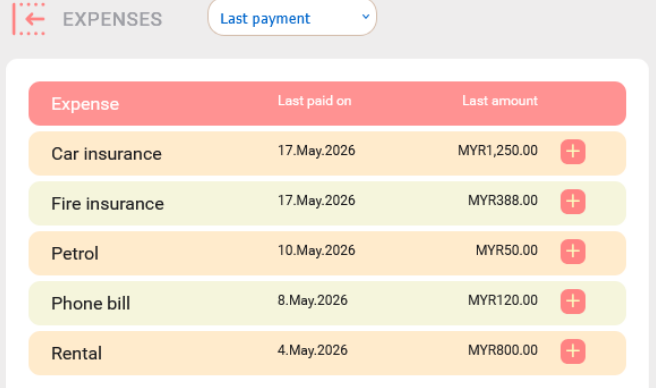
Attached is a sample expenses screenshot. It shows the last payment on each expense that you have paid. You may use it like a reminder without having to set up any reminder which is great.
-
On the other hand, tapping on the column header will sort the records. For example, you tab on the “Last paid on” and the data will be sorted last date first or first date first.
-
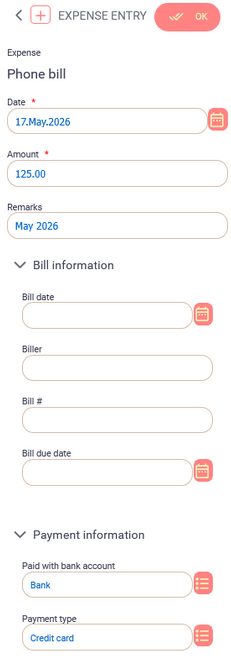
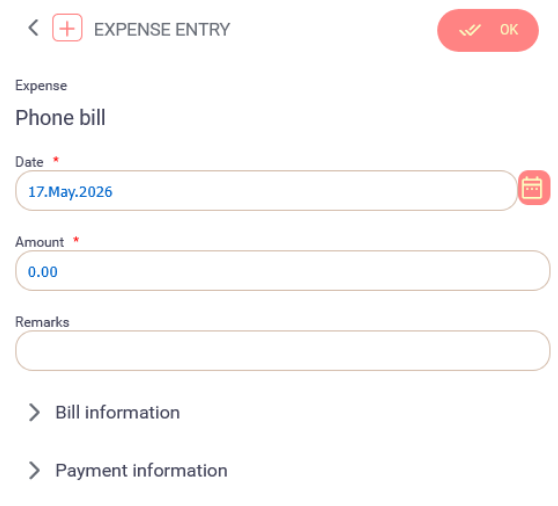
To key in a new expense that you have paid, click on the plus icon next to the last amount field.Attached is sample screenshot. There are two compulsory fields: date and amount. All other fields are optional. If you leave the payment fields blank, the system will automatically pick up the default value for it. If no default value has been set up, the system will automatically create a new bank account (in Chart of Accounts) and a new payment type.
-
Once your expense has been saved, the accounting processes will be running behind the scene to do the necessary posting.
Q: How to track your expenses on a mobile phone like iPhone or Android phone?
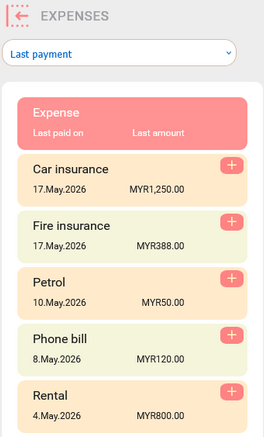
A: You can access the Expenses Register with any mobile phone as long as the latest browser has been installed and a stable Internet connection. Attached is the screenshot when you are accessing it with a mobile phone:
Q: I have 5 sales staff who are traveling around the country and we want to track their monthly expenses. Can you system help?
A: Yes. You may have to subscribe to 5 databases. Then, every sales staff has to key in their expenses in their individual database. At the end of the month, your accountant has to download the expenses in spreadsheet format, review the expenses and then import it into your back end system (which could be your accounting system or ERP).
Q: I like the simplicity of your Expenses Register, can I use it to track my personal expenses?
A: Yes. In this case, you will subscribe to a database, set up your expense account and then start using the system. If you want to track your business expenses as well, it is advisable to subscribe to 2 databases: one for your personal expenses and one for your business expenses.
BitzButler CRM simplified the complex expenses entry and analysis
The Expenses Register in BitzButler CRM automates bookkeeping for small businesses and freelancers, enabling easy expense tracking without prior accounting experience. The platform streamlines vendor monitoring and cash flow management across multiple views, providing a user-friendly interface that works on both desktop and mobile devices.
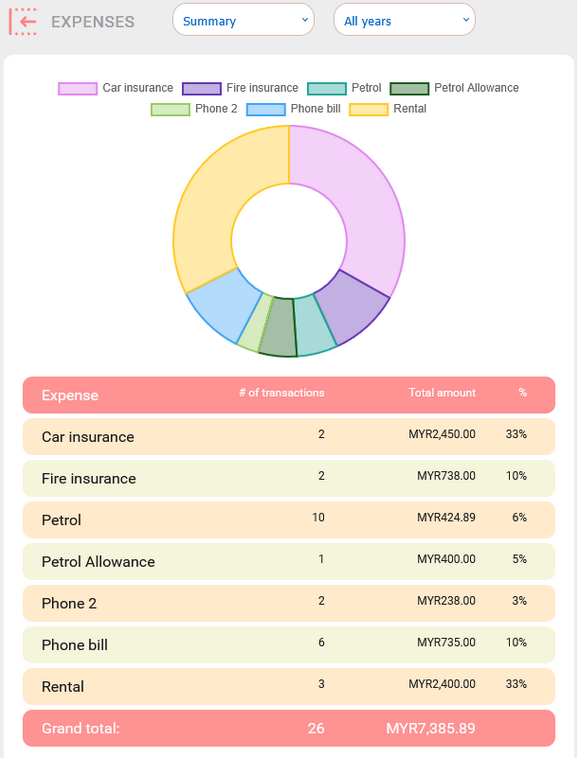
Ultimately, you should have a dashboard like this which gives you an idea in managing your spending.
See your own dashboard — Sign up in 30 seconds. No credit card needed to sign up.
To help the user in managing and analyzing their expenses, there are 6 different views in the Expenses Register which includes,
- Settings view
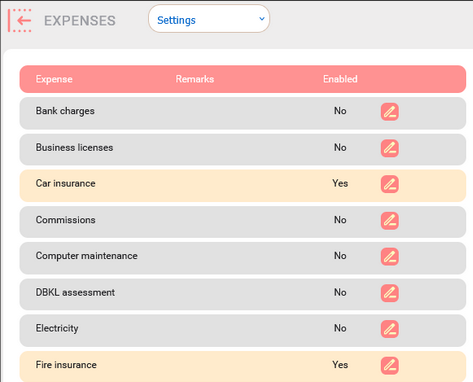
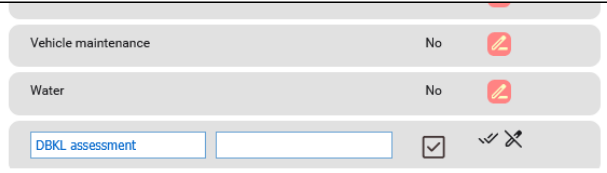
- We have a stock of common expenses for you to choose. You can easily activate or deactivate any expense. If you need any uncommon expenses like DBKL assessment bill or Indah Water bill, you can create it on the fly by editing the last blank row. Just click on the pen icon on it.
- Last payment view
- Serve as a simple reminder for you to review which expense has been paid and which one has not.
- History view
- This view shows all expenses that you have keyed in. You may edit any expense that you have keyed at any time.
- Summary view
- This view shows a summary of all expenses and the overall percentage of each expense. It gives you an idea on how you spend your money in your business.
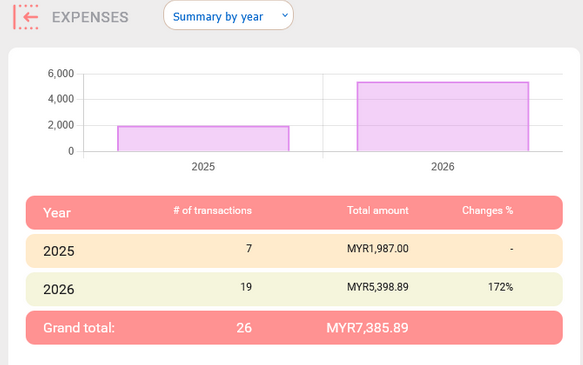
- Summary by year view
- A view for comparing your yearly expenses.
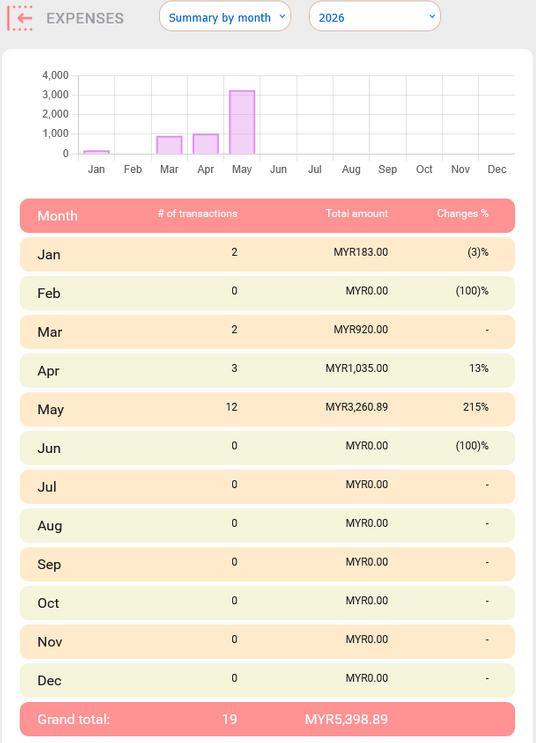
- Summary by month view
- A view for comparing your monthly expenses.
These views are very user friendly and intuitive to use. Our back end process helps in managing the details such as journal posting and all these details are hidden to the user. For example, when you submit a phone bill with RM100, your bank account balance will be reduced by RM100, your Profit will reduce by RM100. Then, the Balance Sheet will be recalculated as well. If you made any mistake by choosing a wrong expense, you change the phone bill to electricity bill, the system will recalculate everything for you automatically. This is crucial to maintain your account integrity.
Settings View
This view is for adding and removing an expense account. This view is for the first time user and whenever you need to add or remove any expense account. There is a stock of common expenses for you to choose. You can easily activate or deactivate any expense for the “Last payment” view.
Here’s the Settings view:
If you need any uncommon expenses like DBKL assessment bill or Indah Water bill, you can create it on the fly by editing the last blank row. Just click on the pen icon on it (please refer to screenshot below). You will have to fill in the description, remarks, make sure the square box has a tick, and finally click on the double tick icon to create the new expense account.
Last Payment View
It shows the last payment on each expense that you have paid. You may use it like a reminder without having to set up any reminder which is great.
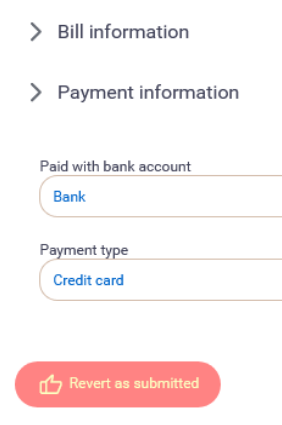
To submit a new expense, click on the plus icon next to the Last amount field and the following popup will appear. Choose the payment date, the amount, key in any remarks and hit the OK button (located at the top right) to save it. The Bill information and Payment information section contains the optional fields. It is not necessary to fill in those fields unless your accountant makes a hard rule. Otherwise, just leave it blank. For the payment fields, the system will automatically use the default value. If no default value has been set up, the system will automatically create a new bank account (in Chart of Accounts) and a new payment type. Very straightforward and reduces the fear of too much data to key in.
History View
All expenses that you have keyed in will appear on this screen. You can filter the records by status - either Submitted or Deleted. You can filter the records by a specific expense account such as Phone bill. Just click on “All expenses” and choose “Phone bill”. The records will be filtered.
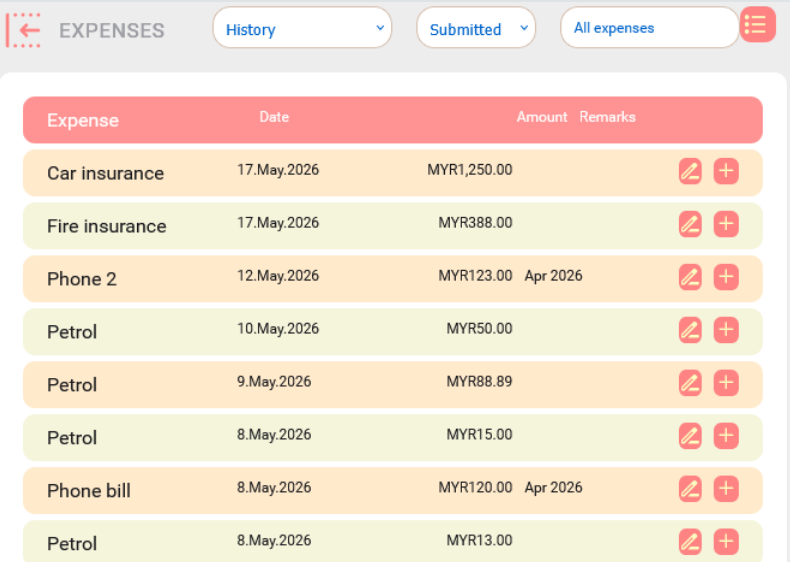
You can recover any deleted record by clicking on the “Revert as submitted” button at the bottom on the entry screen.
Summary View
This view shows a summary of all expenses and the overall percentage. The percentage is an indicator of where you have spent your money.
Summary By Year View
This view is for comparing your yearly expenses and how much it has increased year after year. Bear in mind that if the percentage of change is higher while your sales do not, you might be over spent or your product/service charges are too low.
Summary By Month View
This view is for comparing your monthly expenses and the percentage of changes a month after another month.
Summary
Have you found our Expenses Register easier to operate as compared to other accounting software that you have used?
Work easy, not crazy: let our digital butler handle the chaos. Wanna know how? Reach us out or sign up for the trial version! 😎
Start Tracking Your Expenses for Free. No credit card needed to sign up.
#Expenses Register | #Tutorial | #Accounting | #Blog listing